

8 October 2026 | If You Cannot Speak, Can Your Phone Speak for You?
Your phone may hold the names and numbers of everyone you love. But if an emergency leaves you unable to communicate, could someone reach those people without knowing your PIN? Asterix Fire & Rescue encourages every household to make emergency contacts and essential medical information accessible while their phones are locked.
A Difficult Reality at Emergency Scenes
At Asterix Fire & Rescue, we have encountered accident scenes where establishing a person's identity and locating their next of kin proved extremely difficult. Tragically, some of these incidents involved people who had passed away.
After a serious collision, a wallet, identity document or handbag may be trapped inside the wreckage, scattered or inaccessible. Searching for information is not always straightforward or safe.
Sometimes, a ringing phone helps us locate it before we find any identification. Yet the phone may require a PIN or password, leaving the owner's contacts and other useful details out of reach.
Finding a phone does not necessarily mean we can find the person who needs to receive that important call.
Patient Care Comes First
An unresponsive person must not simply be assumed dead. At an emergency scene, immediate priorities include scene safety, appropriate patient assessment and any life-saving assistance indicated within the responder's training and scope of practice.
Searching for identification or contacting relatives must not delay urgent care. Decisions about resuscitation and the determination of death belong to appropriately qualified personnel acting under applicable clinical protocols.
For members of the public, the immediate action is to call emergency services, describe the situation and follow the dispatcher's instructions. Do not enter dangerous wreckage to retrieve a phone or personal belongings.
Why Access May Be Restricted at a Fatal Scene
Once a death has been confirmed, preserving the scene and treating the deceased with dignity are essential. A fatal collision requires investigation, and the position of the body, the vehicle and surrounding items may be relevant evidence.
Responders should avoid unnecessary disturbance, restrict access where appropriate and coordinate with SAPS and the Forensic Pathology Service. A body should not be repositioned merely to search pockets or attempt to unlock a phone.
Any necessary changes made during rescue, treatment or the management of an immediate hazard should be documented and communicated to the investigating personnel.
South Africa's Regulations Regarding the Rendering of Forensic Pathology Service provide for examination and documentation at the scene. Removal of a body by the Forensic Pathology Service requires written SAPS authorisation on the prescribed SAPS 180 form.
This does not mean the entire investigation or a post-mortem examination must be completed before recovery. It means that scene procedures and the required authorisation must be followed.
Accessible emergency contacts may help authorities locate relatives. They do not, on their own, establish the deceased person's identity or replace formal identification and appropriate next-of-kin notification procedures.
Why Fingerprint Unlocking Cannot Be Relied On
It is not medically accurate to say that fingerprints automatically stop working at the moment of death. The ridge patterns do not immediately disappear, and fingerprints remain an important method of forensic identification after death.
However, forensic fingerprint identification and unlocking a mobile phone are different processes. Phone sensors use different technologies, including electrical measurements, optical imaging and ultrasound. Their performance depends on the sensor, the condition of the skin and the device.
Post-mortem changes, including drying and changes in the skin's physical and electrical properties, can affect fingerprint capture. Injury, contamination and damage to the phone may also prevent a successful scan.
Rigor mortis is the muscular stiffening that develops after death as adenosine triphosphate (ATP), the energy required for muscle relaxation, becomes depleted. It develops over time and may make positioning a hand difficult. It does not erase fingerprints and is not a universal explanation for a phone refusing a fingerprint.
A phone can also require a PIN or password for security reasons, regardless of the condition of the finger. Depending on the device, this may happen after a restart, repeated unsuccessful biometric attempts or other security conditions.
The practical message is simple: do not rely on someone being able to unlock your phone using your fingerprint or face. Make essential emergency information available while the phone remains locked.
This Could Help You While You Are Alive
Emergency information is equally important when someone survives an incident but cannot communicate. A person may be unconscious, confused, seriously injured or too unwell to explain their medical history or identify someone to contact.
This can happen at home, at work, while exercising, in a shopping centre or on the road.
Information about serious allergies, medical conditions and current medication may support clinical assessment. A trusted contact may also provide useful information and help arrange support for the person's family.
These details supplement professional assessment. They do not replace it, and emergency treatment must not wait for a relative to answer the phone.
What to Include in Your Emergency Information
- Your name: Use your full name so it is easier to establish who the information belongs to.
- Emergency contacts: Include at least two trusted people where possible, with their relationship to you.
- Important medical conditions: Record information relevant to emergency care.
- Known allergies: Include significant allergies and, where known, the type of reaction.
- Current medication: Keep medication names and relevant dosage information up to date.
- Additional essential notes: Include communication needs or brief information about dependants who may need assistance.
Choose contacts who know you and are likely to answer. Where possible, include someone who does not usually travel with you, in case your main contact is involved in the same incident.
Tell those people that you have listed them and check their numbers regularly.
If children, other dependants or pets rely on you, a short note can prompt your emergency contact to check on them. Keep urgent medical information clear and easy to find.
Saving a Contact as “ICE” May Not Be Enough
Saving someone as “ICE” — In Case of Emergency — in your ordinary contacts does not necessarily make that number accessible from a locked phone.
Use your phone's dedicated emergency-contact feature and enable access while locked.
Samsung Galaxy: Emergency Contacts and Medical Info
On supported Samsung Galaxy phones:
- Open Settings and select Safety and emergency.
- Open Emergency contacts, add your chosen contacts and enable Show on Lock screen.
- Return to Safety and emergency and open Medical info.
- Enter and save your information, then enable Show on Lock screen for those details.
To view the information, wake the locked phone, access its unlock screen and select Emergency call. Look for the emergency contacts and Medical info option. The layout varies between models and software versions.
iPhone: Set Up Your Medical ID
- Open the Health app and select your profile picture.
- Open Medical ID and select the available setup or editing options.
- Add your relevant medical information and Emergency Contacts, including their relationship to you.
- Turn on Show When Locked and save your information.
When configured, Medical ID can be accessed from a locked iPhone by selecting Emergency on the passcode screen, followed by Medical ID. Menus may vary by software version.
Other Android Phones
Search Settings for Emergency information, Medical information or Safety and emergency. Some supported phones use Google's Personal Safety app.
Add your contacts and medical information, then check the settings that allow access while locked. Consult your manufacturer's instructions if your phone uses a different menu.
A Practical Example from Our Fire Chief
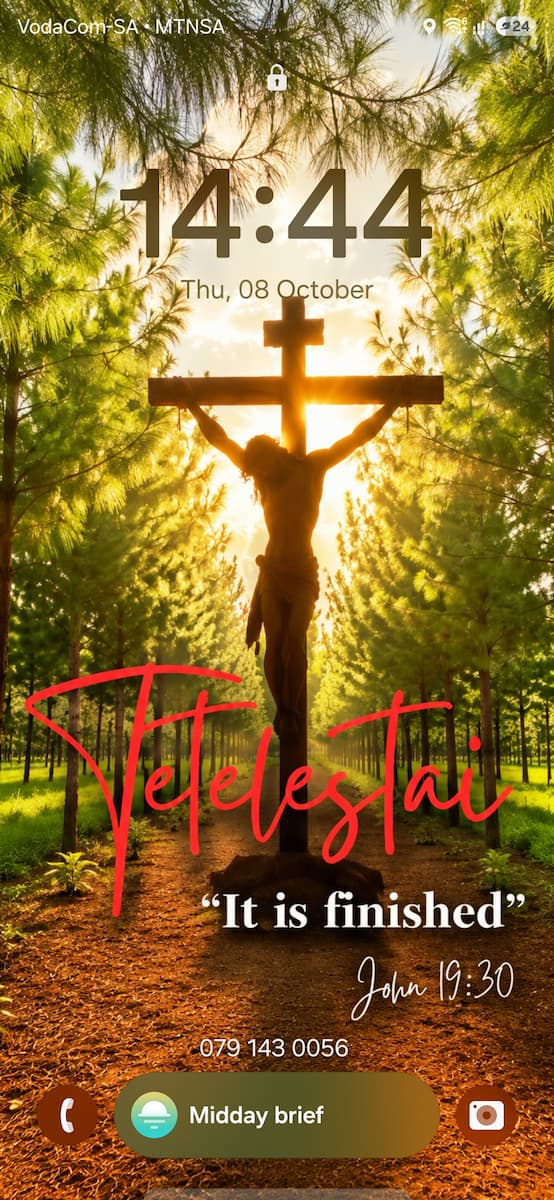
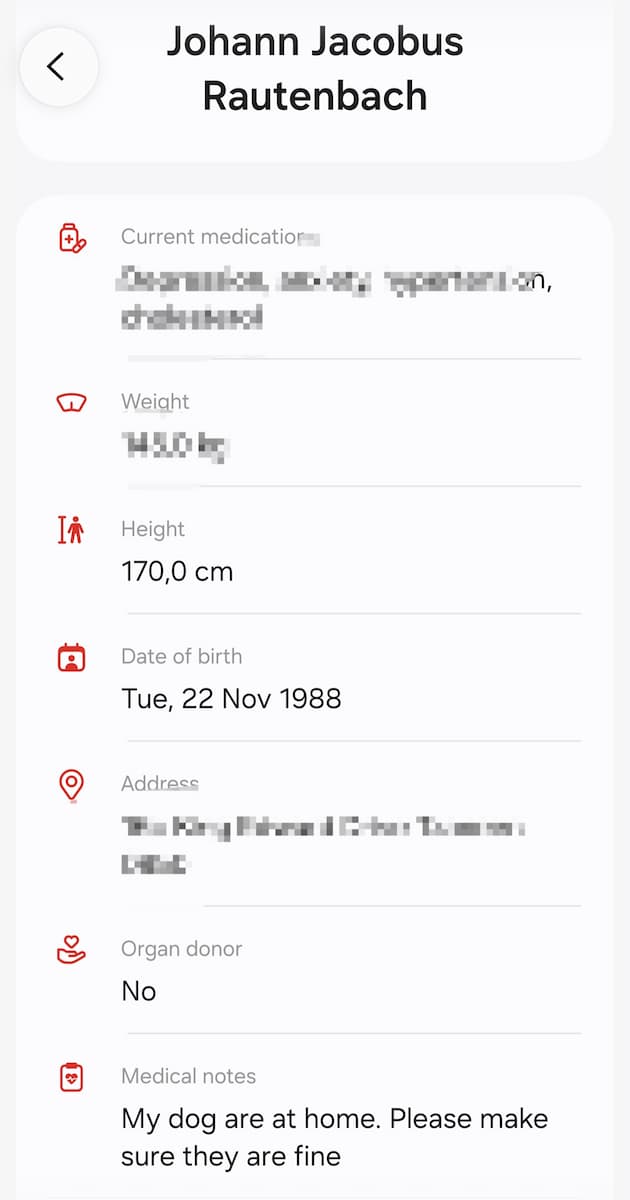
On my own phone, my wife's contact number is displayed on the lock screen. My selected emergency contacts and medical information can also be accessed through the emergency-call screen without unlocking the phone.
The accompanying screenshots show the lock screen, the emergency-contact screen and the medical information page.
Waking the screen does not automatically make these details available on every phone. The information must first be entered, and access while locked must be enabled.
Where supported, an additional lock-screen message such as “Emergency contact: [name and number]” can make a contact immediately visible. This supplements the built-in emergency information.
Check Your Setup Without Making an Emergency Call
Ask someone you trust to see whether they can find your emergency contacts and medical information without unlocking your phone. Ensure that your fingerprint or face does not accidentally unlock it during the check.
Check the displayed information only. Do not place test calls to emergency services or repeatedly press side buttons: some button combinations activate Emergency SOS and may initiate calls or alerts.
Review the details when medication, health conditions or contact numbers change. Check everything again when you replace your phone.
Privacy and a Backup Plan
Information available while locked can be viewed by anyone holding your phone. Include the details you consider necessary for emergency assistance and make sure your chosen contacts understand that their information may be accessible.
Never put passwords, banking details or your phone's unlock code in your emergency information. Conceal private details before sharing screenshots publicly.
A phone can be damaged, lost or out of battery. A printed emergency-information card and, where appropriate, medical-alert identification provide useful backup.
Take a Few Minutes to Prepare Today
Asterix Fire & Rescue encourages households across Greater Tzaneen and Greater Letaba to check their emergency information and help family members do the same.
Add your contacts. Update your medical details. Enable access while locked. Check that another person can find the information.
These simple steps may reduce delays, support emergency care and help the appropriate people reach your loved ones during a difficult situation.
If you cannot speak for yourself, make it easier for someone to find the information and people who can help.
Sources and Further Reading
- Samsung: Emergency contacts and medical information
- Apple: Set up Medical ID
- Google: Emergency features on Android
- Apple: Touch ID and passcode requirements
- Digital capture of fingerprints in disaster victim identification
- Medical reference: Post-mortem changes
- South African regulations: Rendering of Forensic Pathology Service
For an emergency in our service area, phone our 24/7 Emergency Line. Do not rely only on a WhatsApp message.
Asterix Fire & Rescue
Operated by
Asterix The Long Firefighting Dog NPC
Independent Non-Profit Fire & Emergency
Support Service
24/7 Emergency Line:
015 590 8911
Dispatch WhatsApp:
079 624 2809
General Enquiries:
asterix@asterixfire.org
Website:
www.asterixfire.org
FIRE | RESCUE | EMERGENCY RESPONSE
Community-Focused. Professionally Operated. Member Supported.
Jaco Rautenbach
Fire Chief
Asterix Fire & Rescue
This article provides public emergency-preparedness information, not an operational or clinical protocol. Responders must follow their applicable scope of practice, approved procedures and the instructions of the authorities managing the scene. Phone features vary by device, software and region.